

Skip to content

Your recipes. Your tastes. Your kitchen.

Save the recipe.
Make it yours.
Cook with confidence.

Turn TikTok, Instagram, and YouTube inspiration into recipes you can cook. Work in grams, scale your batch, or scan the ingredients you already have to find your next meal.

Available on iPhone, iPad, Android, and the web. Use on web →

Start with your cookbook. Premium adds social imports, AI scans, and cooking help.

Cashew chicken with colorful vegetables, ready to share
From “I want to try that”
to “I made this.”
Recipe overview in My Sous Chef, shown in Light mode

More ways to make something good

Less searching.
More cooking your way.

01 / SAVE THE INSPIRATIONPremium

That recipe you saved?
Make it dinner.

Bring recipes from TikTok, Instagram, and YouTube into your own cookbook. Review the ingredients and steps, make your edits, and save a recipe you can find again.

TikTokInstagramYouTube
  1. Paste a public recipe link
  2. Review the recipe
  3. Save and start cooking

Import results depend on the public source and the recipe information available. Missing details stay visible for review.
02 / MAKE IT REPEATABLEGrams & scaling

Your recipe.
The right amount.

Use gram measurements where supported and scale ingredient amounts to the batch you need. Keep the ratios that worked when you make it again.

1× batch250 gflour
2× batch500 gflour

Scaling example. Cup-to-gram conversions depend on the ingredient; review estimates and unknown amounts. Bake times and pan sizes may need adjusting.

03 / USE WHAT YOU HAVEPremium

A few ingredients.
A fresh idea.

Scan foods in your fridge or pantry, check what was recognized, and get recipe ideas built around what you have. Add your preferences to help shape the result.

Scan → Confirm → Get inspired

Start with your ingredients. Choose an idea. Build a recipe you want to cook.

Review scan results before generating. Check the recipe for anything else you need.

04 / PULL UP A CHAIRThe Table

Good food deserves
good company.

Post your finished plates, publish recipes, and discover what the community is cooking. Save a new favorite or make a recipe your own with Fork & Remix.

You choose which recipes to publish. AI remix tools require Premium.

Take a look at The Table →

A kitchen that gets you

Tell us what works
at your table.

A short kitchen profile helps shape recipe ideas around the people you cook for—not just the ingredients you type.

Set up your kitchen →

Household needs

How many you're cooking for, dietary restrictions, and allergies to avoid across your household.

Your tastes

Favorite cuisines and ingredients, plus the foods you'd rather leave out.

Your way of cooking

Available time, cooking confidence, and cups or grams. Update your answers in Settings whenever things change.

Preferences guide suggestions. Always review ingredients and product labels, especially when cooking for someone with an allergy.

From inspiration to the dinner table

One home for the recipes you love.

01

Bring it together

Save family favorites, add your own recipes, or use Premium to import a social link or scan a recipe.

02

Make it yours

Review ingredients, adjust your batch, and organize the recipes you want to cook again.

03

Cook and share

Follow guided steps, ask Premium Sous Chef for help, and share your finished dish with The Table.

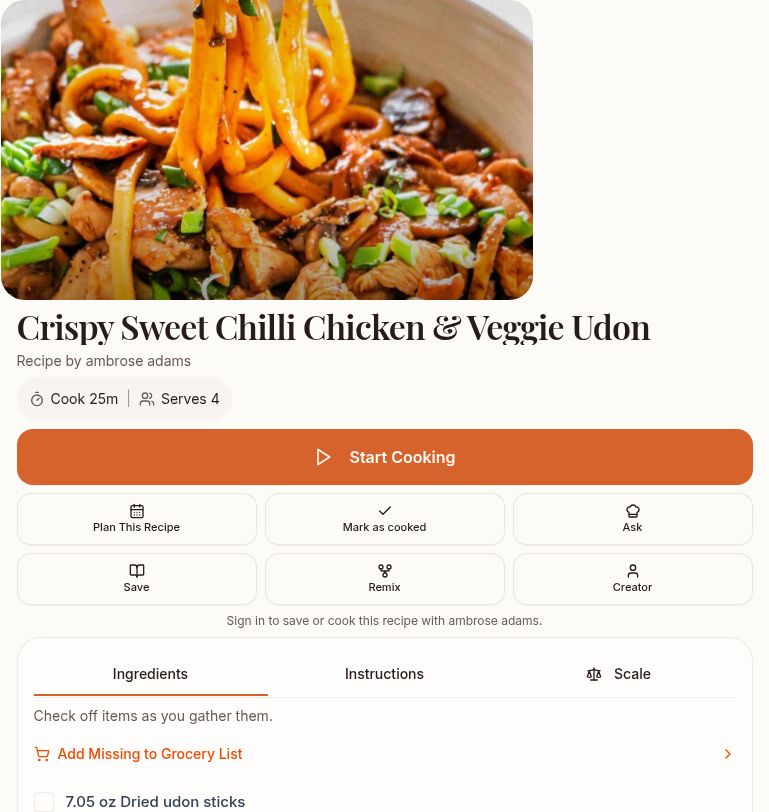
The actual Light-mode recipe overview, with Save and Start Cooking controls
A recipe you can come back to.
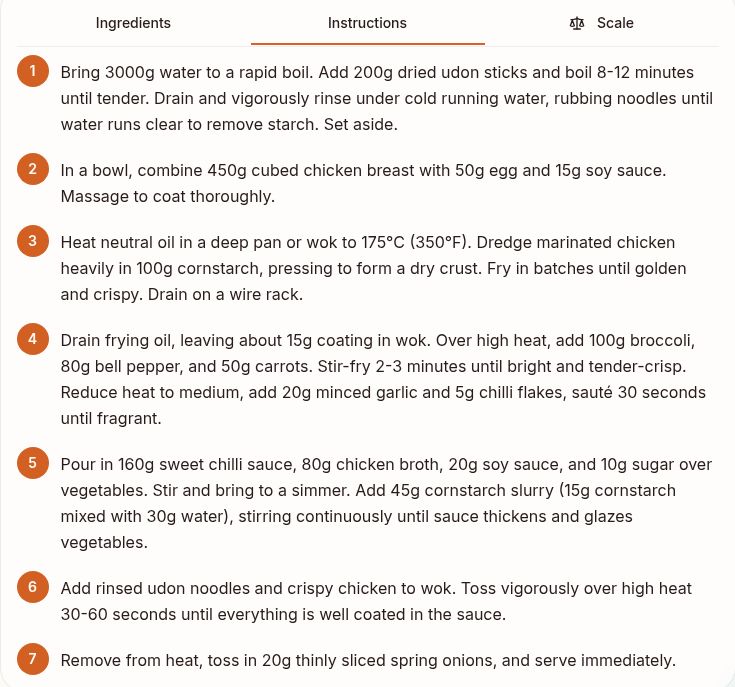
The actual Light-mode instructions screen showing seven ordered cooking steps
Clear steps, right when you need them.

The everyday details, handled

Keep your kitchen moving.

Your own cookbook

Keep favorites, new discoveries, and your own recipes together.

Help as you cook

Follow guided steps and ask Premium Sous Chef about techniques, swaps, or what to do next.

A plan and a list

Plan your meals and turn the ingredients you need into a grocery list.

Aware of your stock

Track what you have so it can inspire your next meal.

Made to be shared

A taste of The Table.

Real recipes shared publicly by the My Sous Chef community. Find inspiration, save favorites, and bring your own creations to the table.

Open My Sous Chef to discover what's cooking on The Table.

Explore on the web →
Join the cooking community →

A few things to know

Before you put
the kettle on.

Can I import from TikTok, Instagram, and YouTube?

Yes, Premium supports recipe imports from these platforms. Paste a public link, review the extracted ingredients and steps, and save. Private, unavailable, or incomplete sources may need more information from you.

Can I use grams and scale recipes?

You can work with supported gram measurements and scale known ingredient amounts. Conversions depend on the ingredient and available information. Review estimates, and adjust cooking times or equipment when changing batch size.

Can I get recipes from a photo of my ingredients?

Premium scan tools help identify foods in your fridge or pantry. Confirm the items, then use them to explore ideas and build a recipe.

How do my tastes and household allergies affect recipes?

Set up your kitchen profile with household allergies, dietary needs, favorites, dislikes, and cooking preferences. These guide generated recipes. You can update them and add individual household members in Settings. AI suggestions cannot guarantee allergen safety; check ingredients and product labels.

What is The Table?

The Table is the cooking community in My Sous Chef. Share finished plates and public recipes, discover other cooks, and save or remix inspiration. Your private cookbook recipes stay private unless you publish them.

What needs Premium?

Premium unlocks social importing, AI scans, Build Recipe, AI remixing, and Sous Chef cooking help. Store prices and any eligible offers appear before purchase.

Where can I use My Sous Chef?

Use My Sous Chef on iPhone, iPad, Android, or the web. Sign in with the same account to access your cookbook. You can explore this page and public recipes without an account.

Save it. Make it. Share it.

Your next favorite recipe
starts here.

Choose your app store · Sign in on the web